This is the first of four blog posts about how we implemented a complex metadata mapping strategy within our enterprise. I was inspired to write these posts to help others use BA Insight metadata tagging products with SharePoint and SQL content. The internet does not have much out there to help people like us walk through real world scenarios on how these tools work together to create a desired solution.
Series of posts describing the Enterprise Metadata Tagging project:
- Enterprise Metadata Tagging – The Requirements [This one]
- Enterprise Metadata Tagging – The Setup
- Enterprise Metadata Tagging – The Implementation
- Enterprise Metadata Tagging – The Demo
We are moving off of an older less flexible metadata tagging system and are looking for a more scalable and efficient system. Here is a list of those goals and requirements for the new system. As well the a description of the conceptual approach and use cases that we will use.
Goals and Requirements
- Automate taxonomy update process – Our current process is manual and we need an approach which would automate that process.
- Increase scale-ability of application taxonomies – We can currently only support 3 application taxonomies. The next system should be able to handle n+1 application taxonomies.
- Keep current taxonomy metadata tagging process in place until consumers can move to new approach – We will be changing our approach from refinements to filters and we have applications which will need time to change from the current properties and approach to the new.
- Increase metadata tagging performance. Always…
- Reduce deployment and down time when updating or adding metadata tagging data, processes or rules – We currently have to redeploy code during any taxonomy change or update.
Conceptual View
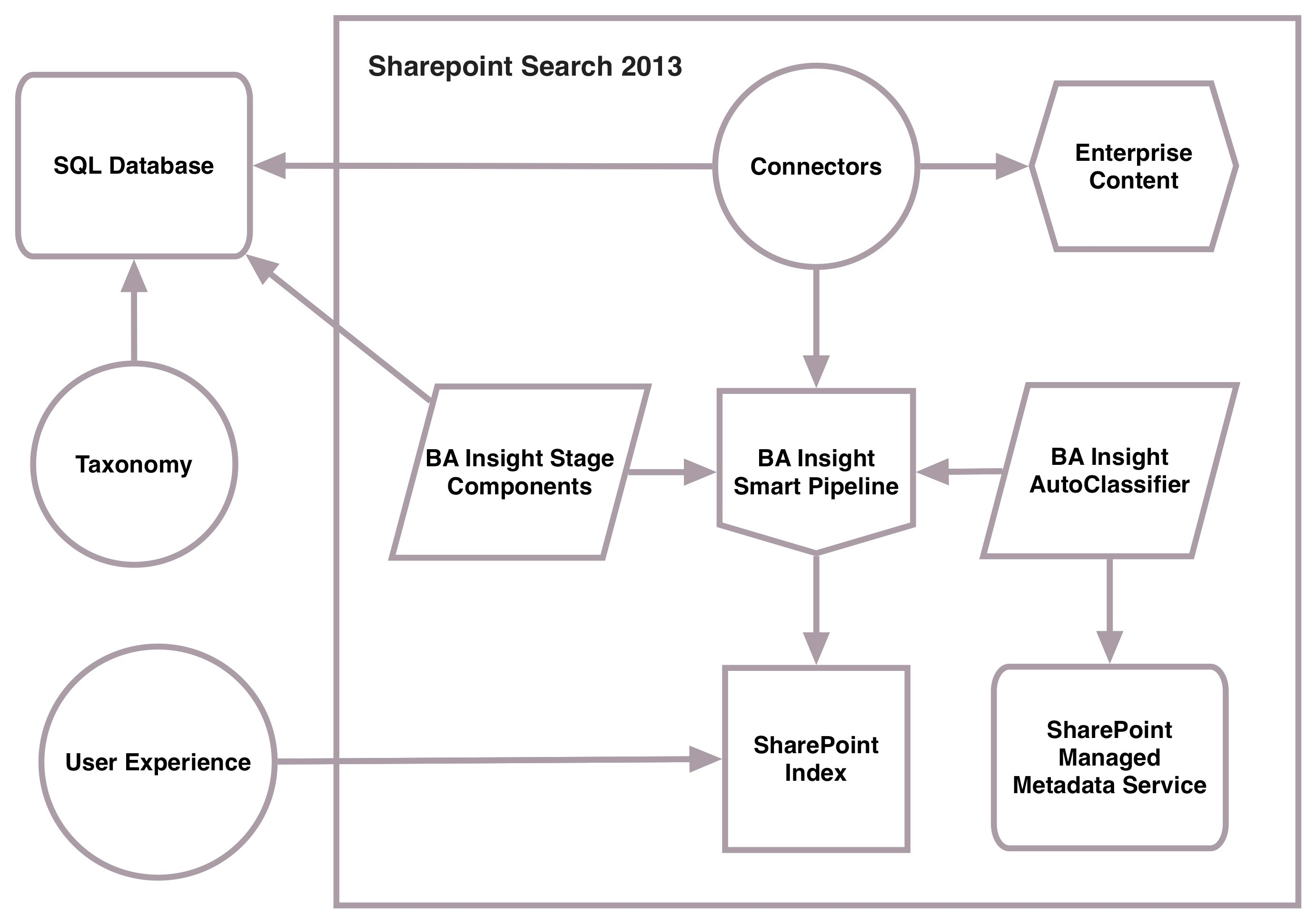
We have a SharePoint 2013 Search index which we crawl our Enterprise data into. Our current user experience (JavaScript enhanced SharePoint page) queries that index for organic, promoted and refinement results.
This prototype will look at using a combination of a SQL database and Managed Metadata Service as sources of metadata for the tagging solution. The SQL database will be automated to consume data from our taxonomy tool and MMS would be used for static data which does not change often.
We have SharePoint, Lotus Notes, SharePoint Online and SQL databases as sources of our Enterprise content. Our current connectors include the SharePoint connector and the BA Insight SharePoint Online, Notes and SQL connectors. We will only use the SharePoint connector and BA Insight SQL connectors for this prototype.
We will be using some BA Insight components to achieve the new taxonomy metadata tagging requirements. Smart Pipeline will be used to interact with the application documents in the SharePoint index pipeline being crawled by the connectors. AutoClassifier will be used to tag the application properties to enterprise properties for static values. Smart Pipeline Components like Custom Entity Extraction will be used to tag the application properties to enterprise properties for dynamically changing values.
Use Cases
- Allow for current metadata tagging process to occur simultaneously through the Content Enrichment Web Service (CEWS) – We have a metadata process in which we will need to have continue after this new process is implemented.
- Tag content to the enterprise taxonomy using the SharePoint and BA Insight SQL connectors – We use the OOTB SharePoint connector and many of the BA Insight connectors but the prototype will only use these two.
- Tag content from application document properties to enterprise taxonomy properties – Identify and tag the application content correctly.
- Tag all enterprise content to enterprise Term Id’s and include Id’s for each taxonomy level. Tag to the enterprise standard and ensure that every Id which is in a taxonomy path is present. This will facilitate the new filtering approach in the user experience.
- Tag content from application document taxonomy property types (TermId, Text and MMS GUID) to enterprise taxonomy. Have ability to use these data types to map to the standard enterprise Term Id.
- Tag content to enterprise taxonomy by application using URL fragments – Use the documents path property to tag to the desired industry or application taxonomy.
- Tag content to enterprise taxonomy by application using document properties – Use the contentsource property to tag content to the correct application Id.
- If content is not present in a specific application document property use an alternative property for tagging to enterprise taxonomy – Use a predefined alternate property to identify the correct taxonomy to tag a document to.
- Dynamically change application taxonomy or enterprise metadata and see changes in search user experience – Demonstrate the normal changes to documents and taxonomies then reflect those changes to the tagging process which in turn tag those changes on the appropriate documents.
 Searching for Bob
[…] Enterprise Metadata Tagging – The Requirements […]
[…] Enterprise Metadata Tagging – The Requirements […]
[…] Enterprise Metadata Tagging – The Requirements […]